Value_ratio
Value Ratio is used to display the progression of a value.
Instances
Two instances of value_ratio are available :
- single_value_ratio, which display only one value.
- list_value_ratio, whichj display multiple values.
They both use the same graphical component.
single_value_ratio
A foating point value, with the following configuration option
- unit "to be append in the text"
- format "string enabling float formating configuration" (to be discussed to ease front development i.e %04d)
Configuration
   ./config.json

   "metrics": [
    {
      "name":  "TARGET_PRECISION", "scope": "dataset","type":  "value_ratio","title": "Targeted precision",
      "description": ".....",  "tooltip": "Target precision inside ODD",
      "config": { "units" : "%"}
    },
Payload
    ./payload.json

    {
        "metricName": "TARGET_PRECISION",
        "values": 0.9
    }
Representations
Company Level Representation
It is an horizontal bar that fills according to the value : 1.0 being full and 0.0 being empty. the fill color starts at red (value = 0.0) and progresses through orange (value = 0.5) to green (value = 1.0)
three examples below: 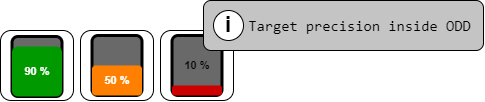
On the third example, the tooltip allow the user the get more information regarding the artefact meaning.
Project Level Representation
It is an horizontal bar that fills according to the value : 1.0 being full and 0.0 being empty. the fill color starts at red (value = 0.0) and progresses through orange (value = 0.5) to green (value = 1.0)

In this example, the infoxbox is also displayed.
InDepth Level Representation
It is an horizontal bar that fills according to the value : 1.0 being full and 0.0 being empty. the fill color starts at red (value = 0.0) and progresses through orange (value = 0.5) to green (value = 1.0)
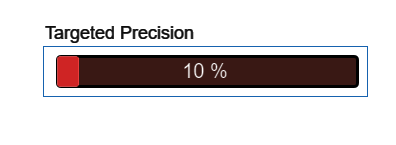
No difference between the Project and In Depth display for this metric.
list_value_ratio
A list of floating point values, with the following configuration options
- unit: "to be appended to each value in the text"
- format: "string enabling float formatting configuration"
Configuration
   ./config.json

"metrics": [
        {
      "name":  "ODD_COVERAGE", "scope": "dataset","type":  "list_val_ratio","title": "Dataset ODD coverage",
      "description": ".....",  "tooltip": "Coverage density of each ODD requierement context",
      "config": { "units" : "%"}
},
Payload
    ./payload.json

 {
    "metricName": "ODD_COVERAGE",
    "linkedMetrics" : [{"type" : "coverage", "metricName" : "ODD_SPECIFICATION", "scopeId" : "?" }],
    "values": [
        {
            "id": "01",
            "coverage" : "1.0"
        },
        {
            "id": "02",
            "coverage" : "0.5"
        },
        {
            "id": "03",
            "coverage" : "0.5"
        }
    ]

},
Representations
Company representation
We use the same representations as for the single value ratio. Only one
three examples below:
On the third example, the tooltip allow the user the get more information regarding the artefact meaning.
Project representation
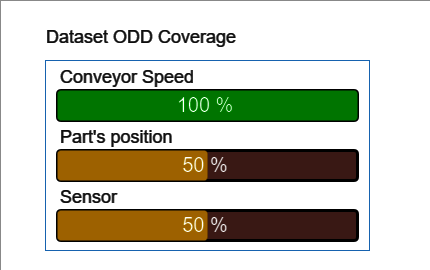
The name of each value 'conveyor speed', 'Part's position' & ' Sensor' is contained in the payload received in scoping v0.0.0 :
    ./payload.json

{
    "metricName": "ODD_SPECIFICATION",
    "values": [
        {
            "id": "01", "origin" : "context",
            "description" : "Conveyor speed",
            ...
        },
        {
            "id": "02", "origin" : "target",
            "description" : "Part’s position",
            ...

        },
        {
            "id": "03", "origin" : "sensor",
            "description" : "Brightness",
            ...
        }
    ]
},
This link is indicated in the ODD_COVERAGE metric as "linkedMetrics".
- [ ] POC : we can use "id" value
- [ ] MVP : use the linkedMetrics mecanism to get the proper name.
In Depth representation
No difference between the Project and In Depth display for this metric.