Managing an AI component
Klarity purpose is to manage the lifecycle of an AI Component : from its specification to its monitoring in operation and the validation stages.
What is an AI Component ?
An AI Component is the component that is designed within Klarity, using Klarity workflow. It encapsulates one or more AI models surrounded by applications designed to ensure the proper functioning of the AI: requirements, quality, security, compliance, risk management, and so on.
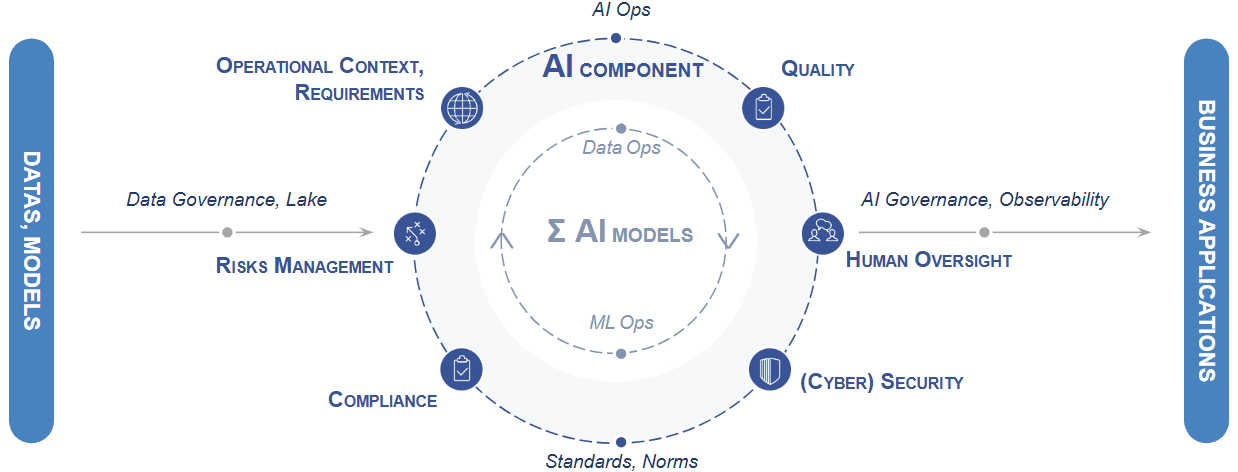
It is this combination that provides the AI function expected by the user: classification, prediction, anomaly detection, ... which is applied to different types of data : image, time-series, video, ...
Lifecycle elements
The whole purpose of Klarity is to enable the specification, validation and operational monitoring of such an AI component.
The lifecycle of an AI Component in Klarity is structured around five objects or concept :
- Stages
- Abstraction Level
- Artefacts
- Configuration
- Project Configuration Item (PCI) and its version (PCIV)
Stages
The lifecycle of an AI Component as seen by Klarity, is broken down into three stages : Scoping, Validation and Operation.
Scoping : phase during which the stakeholders agree on the requirements and constraints that define the scope and expectations of the component to be designed.
- Inputs : Requirements, needs and expectations.
- Outputs : AI Components validated specifications (or rejected)
Validation (formerly 'development') : Phase after which the AI Teams produced an operational version of the AI component whose criteria have been defined and validated during Scoping.
- Inputs : Validated AI Component specifications, Data, Model
- Outputs : AI Component validation for operation (or rejected)
Operation : phase during which the AI component is deployed and used in an operational situation (switching between Activated, Shadow and Deactivated modes)
- Inputs : AI Component,
- Outputs : AI Component operation artefacts & metrics validated (or rejected)
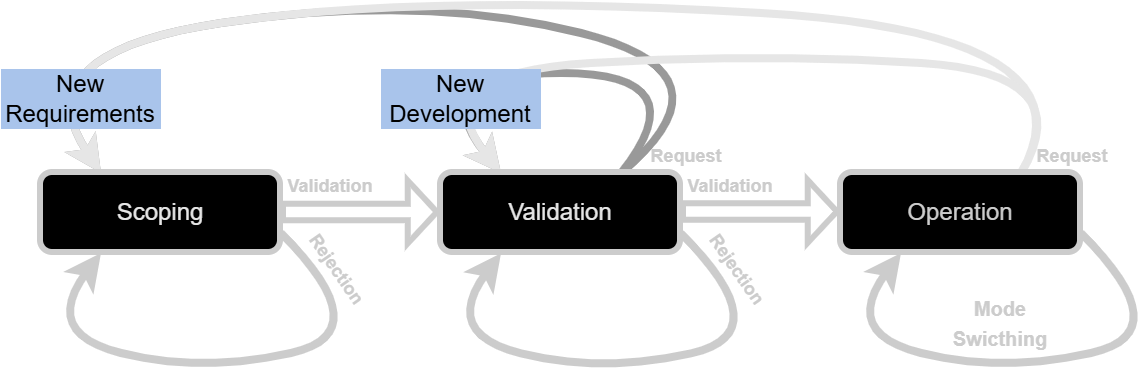
Navigation between the stages is achieved through decisions :
- validating the stage will allow the AI Component to go to the next one,
- rejecting it will request a new version of AI Component for the same stage,
- requesting a stage will ask for a new version of the AI component in a specific stage without rejecting the current one.
- switching mode is only possible in operation and allow to switch the operational mode of an AI component between Activated, Deactivated and Shadow modes.
Abstraction level
An AI component can be viewed with different levels of precision or abstraction:
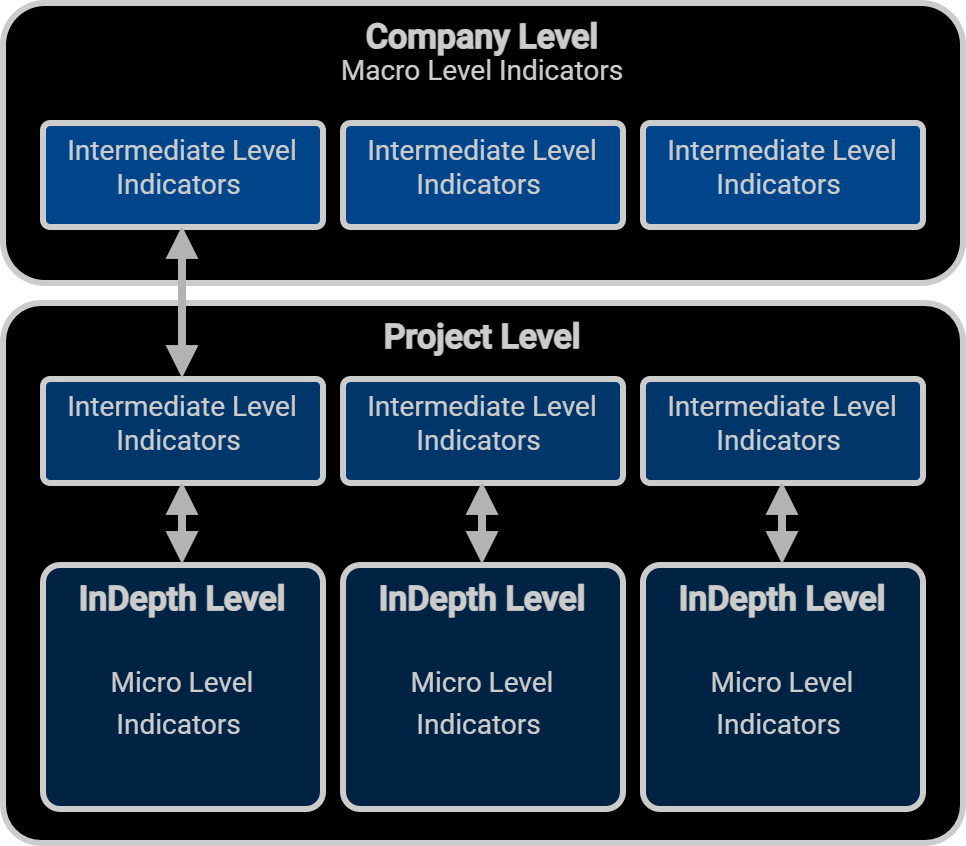
Company : The highest level contains general indicators on the status of the component. We call this the Company level, as these indicators are intended to be viewed in parallel with other AI components from the same company. Generally speaking, the Company abstraction level contains few but synthetic indicators.
Project : When focusing on a specific AI Component, a more precise level of abstraction than that provided by the company abstraction will be useful. This is the purpose of the project level abstraction. At this level :
- artefacts will present finer levels of information and precision than that of company,
- it is possible to achieve action/take decision regarding the AI component as a whole
InDepth : It is possible to focus on an specific artefact going on an InDepth level of abstraction. This way it will be possible to :
- explore the artefact with more details and informations
- compare this AIC version artefact with other versions.
- achieve actions/take decisions regarding the artefact.
Company-level indicators can be associated with project-level indicators, but this is not systematic. On the other hand, project-level and in-depth indicators are bijective.
Artefacts
Whichever stage an AI Component is in, its condition will be described, through Klarity, by means of what we call artefacts: "Artefact refers to informations related to an AI component in the Klarity workflow".
The artefact is thus a means of presenting information that facilitates understanding of an element of the AI component and enables an associated decision to be made.
It generally takes two different forms:
- literal information, such as a description of the expected function, legal or regulatory constraints, etc.
- an aggregation of different metrics whose arrangement within a single component facilitates the understanding of key indicators and enables decision-making.
Groups
Artefacts dealing with the same thematic in relation to the AI component are aggregated in groups or ‘artefact groups’, it makes it easier to navigate the different indicators around the behavior of the AI Component. Thematic can be seen as "performance", "drift", "requirements", and so on.
Configuration
The lifecycle of an AI component in Klarity therefore includes stages, abstraction levels, and artefacts.
The configuration file specifies which artefact is intended for which stage and abstraction level. It does so using "artefact groups'. First, it will define which group of artefacts is expected for each step of the life cycle (stage & abstraction level). Then it will specify which artefacts are contained in each of these groups before specifying the type and nature of these artefacts.
While the same artefact may be present in several stages at different levels of abstraction, but it will not present the same information depending on the level of abstraction at which it is expected.
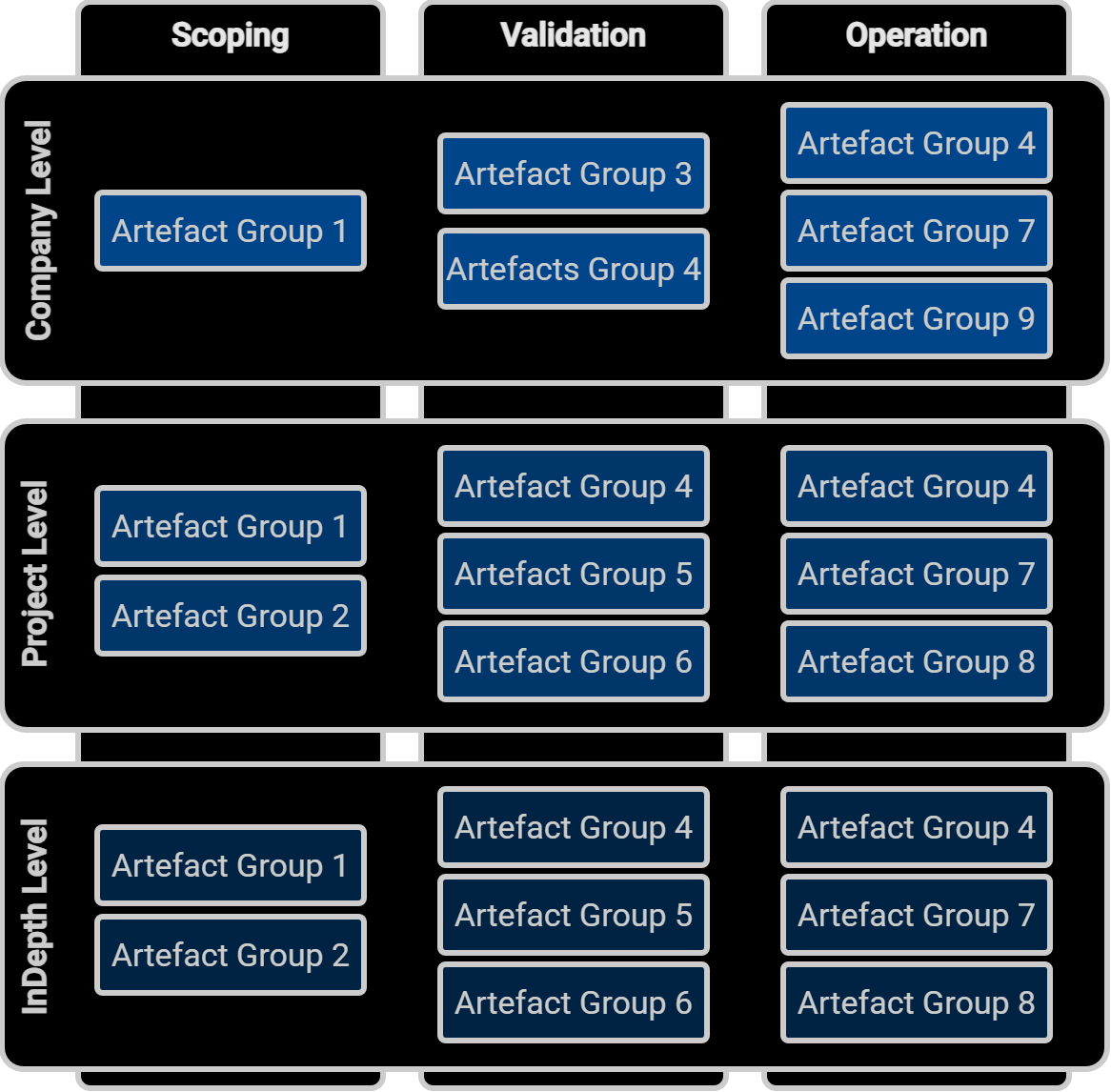
The configuration designates the whole AI-Component life-cycle configuration. It describes, for each stage of the AI Component life-cycle, within Klarity, what are the relevant artefact and metrics that must be produced and validated before going to next stage.
Project Configuration Item
The PCI is the key object managed by KD as any decision is taken for a specific Project Configuration Item version. The PCI is the aggregation of artefacts, decisions, comments and rationales related to a project managed with Klarity.
In term of configuration management, the PCI contain (or reference) all the elements verified and/or validated at one step of the lifecycle of an AI Component, and how it iteracts with a system.
Exploring the content of the differents PCI might allow to answer the following questions :
- What are the goals of the AI Component ( AI Component Requirements and Interface with the rest of the system)
- How and by whom theses goals where validated, the tradeoff between the differents version of PCI, etc.
- The links between demonstration artifact, performance validation test, expert analysis and requierements
PCI Version
The PCIV (Project Configuration Item Version) is an instance of a Project Configuration Item. The version is identified around 3 digits : X.y.z.
- The first one designate the Scoping stage, thus, the specification.
- The second one refers to the validation stage, thus, the actual version of the component being developed
- The third and last one corresponds to the epoch and should therefore not be considered as relating to the component version but rather to the payload version in operation, used to produce the artefacts.
Updating the requirements
When updating the requirements, the first digit will increment : 0.x.y > 1.x.y > 2.x.y, and so on.