Klarity concept definitions
Definition and description of mecanisms behind the multiple concepts on which Klarity is based. If you need to add precision on a concept, add an entry here.
External concept
Configuration Item
Configuration management[^1] designates all the processes involved in ensuring Klarity's performance consistency and compliance with requirements, throughout it's life cycle. In this perspective a configuration item refers to the elementary unit, aggregating hardware,software or any elements (processed data, services, network configuration...) of Klariy.
[^1]: ISO 21886:2019 Space systems — Configuration management.
Component (SysML v2 Part)
There are many definitions of system component, you can find several bellow depending on the point of view [^2] :
- Entity with discrete structure, such as an assembly or software module, within a system considered at a particular level of analysis [[^3],[^4],[^5]]
- One of the parts that make up a system [^6]
- Object that encapsulates its own template, so that the template can be interrogated by interaction with the component [^7]
- Specific, named collection of features that can be described by an IDL component definition or a corresponding structure in an interface repository [^8]
- Functionally or logically distinct part of a system [^9]
Note
A component can be hardware or software and can be subdivided into other components. Component refers to a part of a whole, such as a component of a software product or a component of a software identification tag. The terms module, component, and unit, part are often used interchangeably or defined to be subelements of one another in different ways depending upon the context. The relationship of these terms is not standardized. A component can be independently managed or not, from the end-user or administrator's point of view.Regarding Klarity, we will consider a component as an extract of SysML v2 part (Beta release) :
- A part (...) represents a modular unit of structure such as a system (...), that may (...) interact with the system.
- A system is modeled as a composite part, and its part usages may themselves have further composite structure.
- The parts of a system may have attributes that represent different performance, physical and other quality characteristics.
- The parts may have ports that define the points at which those parts may be interconnected
- Parts may also perform actions resulting in items flowing across the connections between them, and exhibit states that enable different actions.
[^2]: extracted from ISO/IEC/IEEE 24765:2017 [^3]: ISO/IEC 25010:2011 Systems and software engineering [^4]: Systems and software Quality Requirements and Evaluation (SQuaRE) [^5]: System and software quality models, 4.3.3 [^6]: IEEE 1012-2012 IEEE Standard for System and Software Verification and Validation, 3.1 [^7]: ISO/IEC 10746-2:2009 Information technology — Open Distributed Processing — Reference Model: Foundations, 9.26 [^8]: ISO/IEC 19500-3:2012 Information technology — Object Management Group — Common Architecture Request Broker Architecture (CORBA) — Part 3: Components, 4.1 [^9]: ISO/IEC 19506:2012 Information technology — Object Management Group Architecture-Driven Modernization (ADM) — Knowledge Discovery Meta-Model (KDM), 4
Internal concept
AI component (AIC)
We will use SysML V2 to formalize component as part in Klarity, we will consider two kind of component :
- AI Component (AIC): The component that is designed within Klarity
- Other component : any component with which the AIC design process, with Klarity, will have to interact.
Hypothesis on how an AIC will be mabage inside a project
- A project is dedicated to the design of at least one AIC that can interact with other component design outside of Klarity
- An AIC is considered as a leaf component and will not be decomposed inside Klarity
- These hypothesis may evolve in future version of Klarity.
More information on AI Component
Project Configuration Item (PCI)
The PCI is the key object managed by KD as any decision is taken for a specific Project Configuration Item version. Just like a classic Configuration Item, the PCI is the aggregation of artefacts, decisions, comments and rationales related to a project managed in KD
In term of configuration management, the PCI contain (or reference) all the elements verified and/or validate at one step of the lifecycle of an AIC, and how it iteract with a system.
Exploring the content of the differents PCI might allow to answer the following questions :
- What are the goals of the AIC ( AIC Requierements and Interface with the rest of the sysème)
- How and by whom theses goal where validated, the tradeoff between the differents version of PCI
- the links between demonstration artifact, performance validation test, expert analysis and requierements
POC : this just show how to display an information related to a specific version of Klarity. MVP : One project consider only one AIC and it's interaction with the system outside of the project.
PCI Content
- Name : the name of the project.
- Configuration Reference : The reference to a configuration file shared with all the PCIV of a same project.
- Version : The version of the PCI, see (Versioning ) for more details.
- Previous Versions : the previous version of this PCIV, can be multiple when merging.
- Stage : The stage of this PCVI, as stages are closely related to versions again see (Versioning ) for more details.
- Validation Status : Status of the PCIV with regard to the validation steps. See Validation Status for more information.
- State : a PCIV is either in an Active or a Passive state
- Artefacts : Artefacts list (from Configuration Reference) and content (from payload) to be displayed for each stage and abstraction level.
Project Configuration Item Version (PCIV)
One version of an instance of a project configuration item (PCI).
The content of a PCIV :
- immutable information provided or referenced by KM
- decision, comment and rational managed by KD that become immutable once the PCIV is validated
Formally the PCIV is :
- The object Configuration Reference shared with some of the other PCIV
- The PCIV payload with the new artefacts added / modified for the PCIV
- The chain of previous payload build from Previous Versions
- The external object reference inside these document (i.e images, data object, ...)
- all the decision / comments / rational (and associated accountability) to the current PCIV and ancestors build from Previous Versions
We might include a function which export the PCIV content and/or generate a report based on a PCIV
Stage
The various stages inherent to a project workflow, starting from the initial scoping stage to the final operation stage.
Scoping : phase during which the stakeholders agree on the requirements and constraints that define the scope and expectations of the component to be designed.
- Inputs : Requirements, needs and expectations.
- Outputs : AI Components validated specifications.
- Roles Involved : Product Owner, Business Expert, Quality Engineer and Lead Dev AI
Validation : phase during which the design teams produce an operational version of the component whose criteria have been defined and validated during Scoping.
- Inputs : Validated AI Component specifications, Data, Model
- Outputs : AI Model, AI Component
- Roles Involved : Product Owner, Business Expert, Quality Engineer and a whole AI Dev Team
Operation : phase during which the component is deployed and used in an operational situation.
- Inputs : AI Component,
- Outputs : Monitoring Artefacts
- Roles Involved : Product Owner, Business Expert, Quality Engineer, System Operators
While the various stages of the process are clearly sequential they are generally also iterative: there can be multiple occurrences of each stage and a preliminary stage can be requested from a later one if some new elements must be taken into account earlier in the design cycle. This will happen in particular when new elements emerge from the project or from external factors (e.g. changes in regulations)
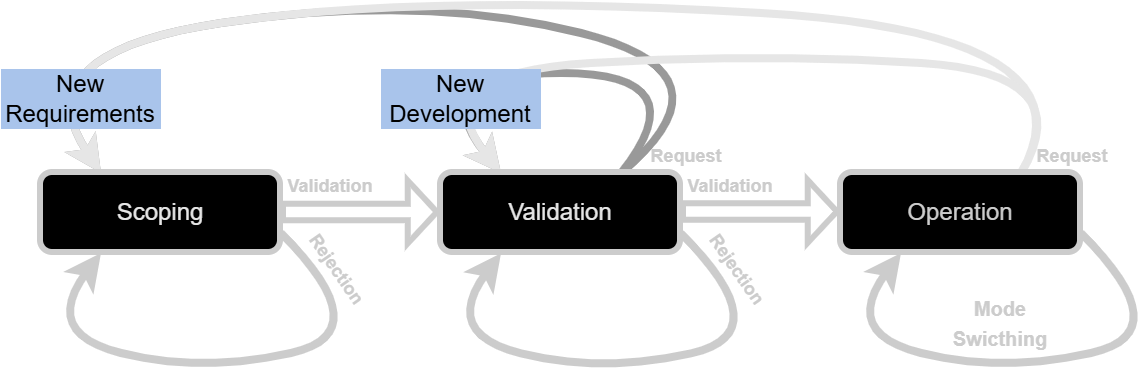
➡ These steps will be used in the role-based access control (RBAC)
➡ The project workflow currently contains three stages. Yet, allowing the increase of stage would probably be appropriate. This could be achieved in multiple ways, three of them are already identified and are not mutually exlusives :
- by splitting the validation stage into two or three stages : data, integration, evaluation, for instance,
- by generating sub stages into macro stage,
- the project configuration file could contain the description of the various stages and their mutual links. this would allow the user to create its own workflow directly.
Abstraction level
Depending on their role, users will not need access to the same level of precision with regard to the different artefacts of each (PCIV). In order to simplify access to and navigation through project artefacts, three levels of abstraction are proposed.
- Company :
- overview of all of a company projects,
- allow to go directly to where action shall be taken
- Project : overview of one project artefacts,
- Gave a synthesis view for the PCIV displayed
- In Depth : zoom over a project group of artefacts
- this group can contain one to several artefacts,
- depending on the type of the artefacts, we can have different UI
- a UI diplaying link graphical component (e.g. see confusion_matrix)
- provide a UI mecanism to review and validate individually all the artefacts of the group artefact_list
➡ Discussion #48
Views
A view designate a dashboard associated to the combination of a project stage and an abstraction level.
In the layout, displayed content will be selected from active navigation. The different representation of these part will be called "view". We have identified 9 views, with each being a combination of a stage and an abstraction level.
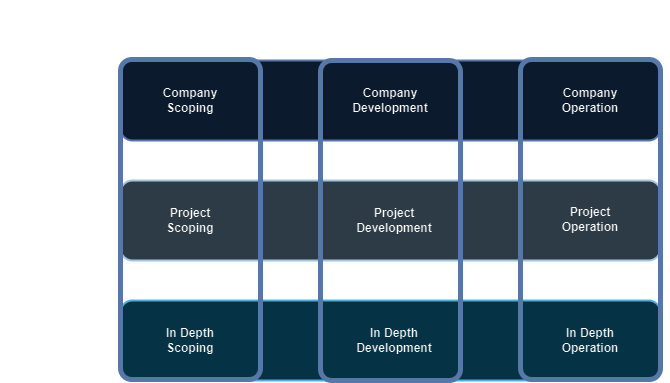
Company Level
- Company-Scoping : A company overview over the components in scoping
- Company-Validation :A company overview over the components in validation.
- Company-Operation : A company overview over the components in operation.
Actually there is only one "Company-AbstractionLevel" view. Yet, it proposes sorting and filters functionalities that allow to display only components from a specific abstraction level.
Component Level
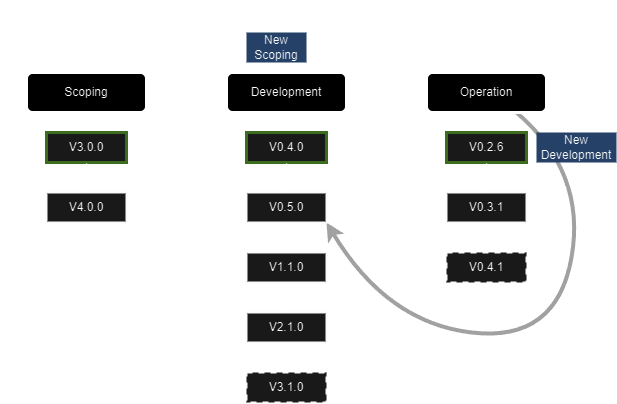
As stated earlier, a component can have multiple version each being identified by a PCIV. It means that for one component you can have a version being in scoping, another one being in validation and a last one, being in operation. You may even have multiple version on a single stage, yet, in that case, only one would have an active state. From the company view, for any diplayed project, you can select a version (PCIV). Doing so, you'll automatically switch to the corresponding view : for instance, if the selected version is at its scoping stage you be redirected to the Project-Scoping view.
Each view display a certain number of artefacts. This list of artefacts is defined in the configuration file associated to the PCIV, so are the values to be displayed.
The project view also offers a global discussion thread on the project as well as functionalities to make decisions relating to its progress (i.e validating or rejecting current version)
- Project-Scoping : An overview over the artefacts of a project in scoping stage.
- Project-Development : An overview over the artefacts of a project in developement stage.
- Project-Operation : An overview over the artefacts of a project in operation.
In-Depth Level
The In-Depth level is accessible from the Project level by selecting one of the displayed artefacts. It allows the user to go on a more detailled level of information regarding this specific artefact. It also offers decision functionalities for this artefact, as well as a dedicated discussion thread.
- In Depth-Scoping : An in-depth view over a group of artefacts of a project in scoping.
- In Depth-Development : An in-depth view over a group of artefacts of a project in development.
- In Depth-Operation : An in-depth view over a group of artefacts of a project in operation.
➡ Discussion #48
Project Validation status
Each PCIV has a specific Validation Status. It starts with a NEED_VALIDATION status and will then evolve with user action. It will be one of the few mutable data in klarity dashboard Validation status is closely related to versioning, see versioning for more precise information.
- ALREADY_VALIDATED : When a version is validated it generates another PCIV with this validation status.
- NEED_VALIDATION : When KM pushes a new version to KD it has, except in special case, this validation status.
- REJECTED : When a version is rejected by a user it gets this validation status.
- VALIDATED : When a version is validated by a user its validation status switches to this.
- AUTO_VALIDATED : Depending on project configuration, if all artefacts of a project are validated, the project is automatically validated.
- OPERATION_UPDATE : When a project in operation updates its artefacts and pushes them to KD. It just lets one knows that new artefacts are available. These may lead to decisions being taken, but no decisions are expected.
V0 : AUTO_VALIDATED can be provided by a configuration if all linked properties are validated : this PCIV may be automatically validated. To be discussed.
State
A PCIV can be either Active or Passive. For each stage, only the latest pushed or requested version is active. Once this version is validated or rejected, any other PCIV available for this stage becomes active, the latest being the first (FIFO).
See versioning - state management for more information and examples.
Artefacts
Artefacts refer to the values, whether required or measured, of a component in the design workflow. It can be the precision of a model, the requested coverage of the operational design domain, the quality of a data set, etc.
Artefacts of a PCIV are described in the configuration file. Artefacts actual values are contained in a payload file which is sent with each new PCIV.
An artefact is always associated to a group, yet a group can contain only one artefact.
An artefacts can be linked to other artefacts which is specificed in the payload.
From the KD point of view, artefacts are immutable values.
More information on artefacts
Artefact Validation status
As Project requires to be validated to proceed to the next stage, artefacts of a project in a project validation status "NEED_VALIDATION" might need to be individually validated as well.
- validation of every artefacts might trigger an AUTO_VALIDATION of the project.
- rejection of a artefacts must be associated to a rationale that will explain the reasons behind this rejection.
➡ TODO : validate the current validation status of a project and then copy paste and adapt a short list of theses status, here.
Metrics
TODO : extract synthesis once metrics page validated More information on metrics
Actions
The various stages of the project lifecycle are naturally punctuated by activities: comments, proposals, reviews of these proposals, validation or rejection, etc. These activities are actions carried out by users. These activities are actions, carried out by users.
A user's right to carry out an action is identified by the term capability. Subcapabilities enable the allocation of capabilities with more granularity: which role at which stage.
This concept is discussed in more detail in the actions section.
Rationale
When a user validates, but more particularly when he rejects a project or a artefact awaiting validation, he must provide a rationale.
A rationale is a constructive explanation justifying the author's decision. It should enable teams to review their submission (of the project or the artefact) on the basis of sufficiently detailed information to be useful to them.
Versioning
Versioning is related to the version of the PCIV. Klarity manages multiple versions of a same project. A version will change with the validation, rejection and stages it is going through.
see Versioning for a complete description.
Validation
The assurance that a product, service, or system meets the needs of the customer and other identified stakeholders. It often involves acceptance and suitability with external customers. Contrast with verification." https://en.wikipedia.org/wiki/A_Guide_to_the_Project_Management_Body_of_Knowledge
Verification
he evaluation of whether or not a product, service, or system complies with a regulation, requirement, specification, or imposed condition. It is often an internal process. Contrast with validation." https://en.wikipedia.org/wiki/A_Guide_to_the_Project_Management_Body_of_Knowledge
:soon_arrow: General Concept Elements - Tracability by Design